
Band Spectrum Analyzer
The band spectrum analyzer, labeled Band Spectrum in CineMon, splits audio into fractional-octave frequency bands and displays each band as a bar. Low frequencies appear on the left and high frequencies on the right; taller bars indicate more energy in that range. A filter bank measures the level in each band.
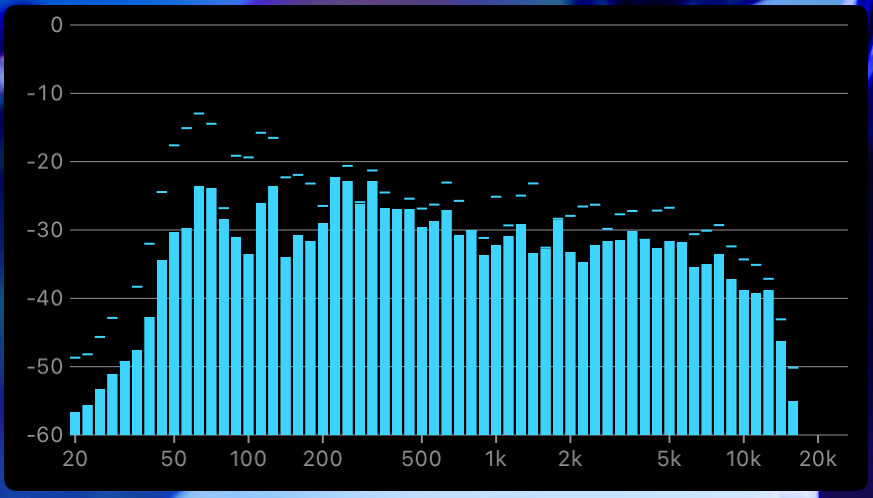
You can show the bars in either 31 bands (1/3-octave spacing) or 63 bands (finer 1/6-octave spacing), and read them as peak or RMS.
An optional peak hold marker retains each band’s loudest recent value for the duration you choose. Decay rate controls how quickly the bars fall after a peak: slower decay makes the display steadier, while faster decay follows changes more closely.
Basic use
Open Scopes in the status toolbar and select Band Spectrum. If the menu is hidden in a narrow window, open More Controls (…).
Use the scope’s settings button to adjust the options described below.
- Choose 31 Bands or 63 Bands, then Peak or RMS.
- Select the channel and adjust Decay Rate so the bars are easy to follow.
Options
| Setting | Options | Description |
|---|---|---|
| Bands | 31 Bands / 63 Bands | Frequency resolution: 1/3-octave or finer 1/6-octave spacing. |
| Meter Type | Peak / RMS | Read instantaneous peaks or the smoothed average. |
| Channel | L/R Average / L/R Max / Left / Right | Which channels feed the analysis. |
| Decay Rate | 4 to 50 dB/s | How quickly the bars fall back after a peak. Default is 11.8 dB/s. |
| Peak Hold | On / Off | Show the peak-hold marker above each bar. |
| Peak Hold Duration | 2 seconds / 4 seconds / 6 seconds / Infinite | How long the peak marker holds before it falls back. |
| Frequency Guide | On / Off | Show frequency guide labels. |
| Floor | -60 dB / -90 dB | The bottom of the display scale. |
The Band Spectrum analyzer is available with the CineMon PRO Audio Monitoring Pack or a CineMon PRO Pass subscription.