
FFT Spectrum Analyzer
The FFT spectrum analyzer, labeled FFT Spectrum in CineMon, uses a fast Fourier transform (FFT) to plot signal level by frequency as a continuous curve. Low frequencies appear on the left and high frequencies on the right; height indicates signal level. Choose an open curve or a filled shape. For a bar display, see the Band Spectrum Analyzer.
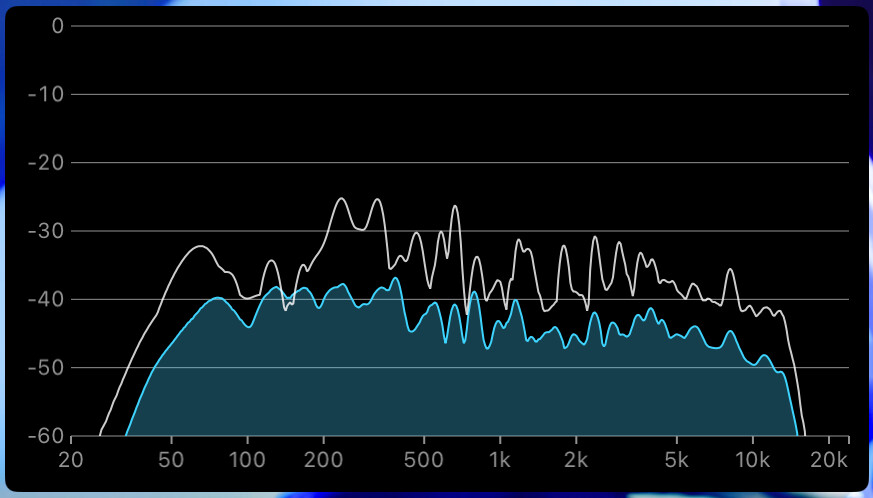
Two controls smooth the curve:
- Spectral smoothing averages neighboring frequencies, reducing narrow spikes. Choose an octave fraction from a broad
1 Octdown to a detailed1/12 Oct. - Temporal averaging averages readings over time, from
OfftoVery Slow. More averaging reduces moment-to-moment changes in the curve.
You can also overlay an instant peaks curve that ignores temporal averaging, so the fast peaks stay visible on top of the smoothed curve. As with the Band Spectrum analyzer, a decay rate sets how quickly the curve and the peaks overlay fall back.
Basic use
Open Scopes in the status toolbar and select FFT Spectrum. If the menu is hidden in a narrow window, open More Controls (…).
Use the scope’s settings button to adjust the options described below.
- Select the channel and choose a curve or filled display.
- Adjust Spectral Smoothing for frequency detail and Temporal Averaging for how quickly the curve responds.
Options
| Setting | Options | Description |
|---|---|---|
| Render Style | Curve / Filled | Draw an open curve or a filled shape. |
| Spectral Smoothing | On / Off | Average neighboring frequencies for a cleaner curve. |
| Octave Fraction | 1 Oct / 1/2 Oct / 1/3 Oct / 1/6 Oct / 1/12 Oct | How much spectral smoothing to apply. Shown when smoothing is on. |
| Temporal Averaging | Off / Very Fast / Fast / Medium / Slow / Very Slow | Smooth the curve over time. |
| Instant Peaks | On / Off | Overlay the fast peaks curve, unaffected by temporal averaging. |
| Window Function | Hann / Blackman-Harris | The FFT analysis window. |
| Channel | L/R Average / L/R Max / Left / Right | Which channels feed the analysis. |
| Slope Correction | None / 3 dB/Oct / 4.5 dB/Oct | Tilt the curve to match a chosen reference slope. |
| Decay Rate | 4 to 50 dB/s | How quickly the curve falls back after a peak. Default is 11.8 dB/s. |
| Floor | -60 dB / -90 dB | The bottom of the display scale. |
The FFT Spectrum analyzer is available with the CineMon PRO Audio Monitoring Pack or a CineMon PRO Pass subscription.