
Goniometer
The Goniometer plots the left and right channels against each other to show the stereo field and the phase relationship between them. A mono signal traces a vertical line, a wide stereo signal spreads out to fill the display, and out-of-phase content leans toward the horizontal, which warns you about cancellation when the mix folds down to mono.
Available with the CineMon PRO Audio Monitoring Pack or a CineMon PRO Pass subscription.
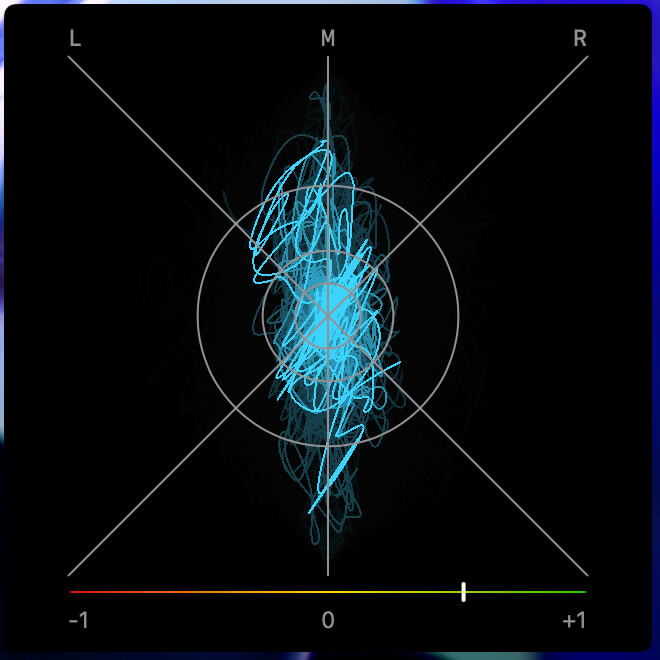
Below the plot, an optional phase correlation meter summarizes the relationship: +1 indicates fully correlated channels, 0 indicates no correlation, and -1 indicates fully anticorrelated channels. Negative values warn of potential cancellation when summed to mono. You can hide it if you only want the trace.
The auto-gain and decay controls live here on the scope, not on the Audio Mixer.
- Auto-gain zooms the trace so quiet signals still fill the display. At zero it is off and the trace stays at its true scale, and as you raise it the scope applies more gain (up to about 10x at full).
- Decay sets how long the trace remains visible, in milliseconds. Shorter decay clears the previous trace sooner; longer decay retains more of its recent shape.
Basic use
Open Scopes in the status toolbar and select Goniometer. If the menu is hidden in a narrow window, open More Controls (…).
Use the scope’s settings button to adjust the options described below.
- Watch the trace while listening to the stereo source. A wider trace indicates more difference between the channels.
- Show Correlation Meter to check phase. If the reading moves toward the negative side, check how the mix sounds in mono.
Options
| Setting | Options | Description |
|---|---|---|
| Auto-Gain | Off to Full | Zooms the trace to fill the display. Off keeps the true scale; full applies up to about 10x gain. |
| Decay | 10 to 1000 ms | How long the trace lingers before it fades. Default is 500 ms. |
| Correlation Meter | On / Off | Show the phase correlation meter below the plot. |