
Audio Level Meter
The audio level meter, labeled Levels in CineMon, displays peak levels (the instantaneous maximum) and, with a PRO Pack, RMS levels (root mean square, a measure of average signal level). The bars show peaks and available headroom; an optional history graph plots levels over time.
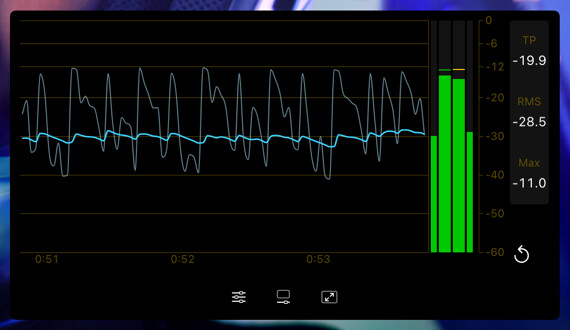
The basic meter (peak bars and scale) is free. The RMS bars and the history graph are available with the CineMon PRO Audio Monitoring Pack or a CineMon PRO Pass subscription.
For program loudness in LUFS (loudness units relative to full scale) against a delivery target, see the Loudness Meter.
Basic use
Open Scopes in the status toolbar and select Levels. If the menu is hidden in a narrow window, open More Controls (…).
Use the scope’s settings button to adjust the options described below.
- Watch the peak bars for headroom and enable Show Readouts for numeric values.
- Turn on Show History Graph when you want to follow levels over a take. Use Reset to clear the held maximums and history.
The meter
A peak hold marker stays at the loudest recent value on each bar, which makes brief transients easy to catch. You choose how long it holds before falling back, and how quickly the bars themselves fall (the Return Time).
The scope tracks the current Peak, RMS, and the session Max. Turn on Detect True Peaks to estimate the peak level of the reconstructed signal, including peaks between samples; the Peak readout is then labelled TP.
Turn on Show Readouts to display those values beside the bars. The readout rail includes Reset (the circular arrow), which clears held maximums and history. Readouts are off by default.
The history graph
Turn on Show History Graph to plot levels over time underneath the bars. The display scrolls as a rolling window: the newest reading appears at one edge and older readings move off the far side. You choose the window length to suit the job, from a few seconds for spotting transients up to five minutes for following a whole take.
The history records continuously. Playback stops, scrubbing, and source changes do not reset it. Use Reset to clear it.
Meter Scale
Choose a dB scale for the meters:
| Scale | Description |
|---|---|
| Production dBFS | Field-recorder style scale with 0, -6, -12, -20, -30, -40, -50, and -60 dBFS landmarks. The default. |
| IEC Type I | Legacy IEC-style scale with more visual resolution near 0 dB. |
| DaVinci Resolve | Resolve-style meter with sparse markings over a 60 dB face. |
| Logic Pro | Logic Pro-style meter with evenly distributed landmarks from 0 through 60. |
Choose the scale in the Scope Settings popover, under Audio Metering → Meter Scale. It is saved with the preset and applies to every audio level meter in that preset, including the mixer strips, so all your meters read consistently. The Show Level Scale option below shows or hides the dB markings on this scope, independently of which scale is selected.
Options
Open the scope’s settings with the slider button on the widget. The options are grouped into Meter and History sections.
Meter
| Setting | Options | Default | Description |
|---|---|---|---|
| Detect True Peaks | On / Off | Off | Estimate true-peak level, including peaks between samples. The Peak readout is labelled TP when on. |
| Show RMS Bars PRO | On / Off | Off | Draw the RMS bars alongside the peak bars. |
| Hold Duration | 2 seconds / 4 seconds / 6 seconds / Infinite | 2 seconds | How long the peak marker holds before it falls back. |
| Return Time | 4 dB/s to 50 dB/s | 11.8 dB/s | How quickly the bars fall back after a peak. |
| Show Level Scale | On / Off | On | Show the dB markings alongside the bars. |
| Show Readouts | On / Off | Off | Show the Peak / RMS / Max readout rail (and the Reset button). |
History
| Setting | Options | Default | Description |
|---|---|---|---|
| Show History Graph PRO | On / Off | Off | Plot levels over time below the bars. |
| Window | 3 sec / 10 sec / 30 sec / 1 min / 2 min / 5 min | 30 sec | Length of the rolling time window shown on screen. |
| RMS Trace | On / Off | On | Draw the RMS trace. |
| Peak Trace | On / Off | On | Draw the sample-peak trace. |
| RMS Response | 50 ms (Very fast) through 1 s (Slow) | 300 ms (Standard) | How quickly the RMS trace responds to level changes. |
| Channel | L/R Average / L/R Max / Left / Right | L/R Average | Which channels feed the history analysis. |
| Range | 60 dB / 90 dB | 60 dB | Vertical dB range of the history graph. |