
Loudness Meter
The loudness meter, labeled Loudness in CineMon, measures program loudness in LUFS (loudness units relative to full scale) using ITU-R BS.1770. Use it to compare a take with your delivery target and true-peak ceiling. For peak and RMS metering, see the Audio Level Meter.
Available with the CineMon PRO Audio Monitoring Pack or a CineMon PRO Pass subscription.
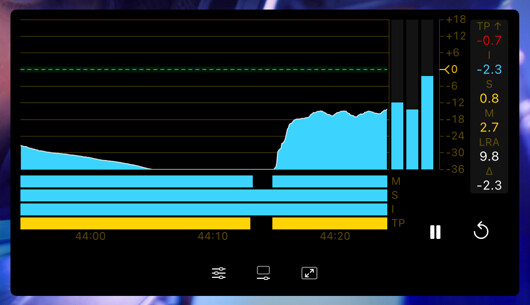
The display includes momentary, short-term, and integrated loudness, a true-peak reading, and a session history graph.
Basic use
Open Scopes in the status toolbar and select Loudness. If the menu is hidden in a narrow window, open More Controls (…).
Use the scope’s settings button to adjust the options described below.
- Choose a Delivery Profile, or set a Custom Target and TP Ceiling to match your delivery requirements.
- Select Reset before measuring a take. Check Integrated loudness and TP when the take is complete.
What it measures
| Reading | Meaning |
|---|---|
| M (Momentary) | Loudness over the last 400 ms. Follows the performance moment to moment. |
| S (Short-term) | Loudness over the last 3 seconds. The usual reading to mix against. |
| I (Integrated) | Loudness of the whole measured programme, gated to ignore silence and quiet passages. This is the number a deliverable is judged on. |
| TP | True-peak level, in dBTP (decibels relative to full scale using true-peak measurement), estimates the reconstructed signal peak, including peaks between samples. The label shows a check when you are under the profile’s ceiling and an arrow when you are over. |
| LRA | Loudness range: how much the loudness varies across the program, in LU (loudness units). |
| Δ | How far the current reading sits from your target. |
Delivery profiles
Choose a Delivery Profile to set the loudness target and true-peak ceiling:
| Profile | Target | True-peak ceiling |
|---|---|---|
| EBU R128 | -23 LUFS | -1 dBTP |
| Generic −24 | -24 LUFS | -2 dBTP |
| ATSC A/85 (Short Form) | -24 LUFS | -2 dBTP |
If you are delivering to a spec that is not listed, turn on Custom Target and set your own target and true-peak ceiling. A custom target changes what the meter is measured against; it never changes the underlying measurement.
Reading the scale
Relative Scale places the target at 0 LU, so readings show how far loudness is above or below it. Turn it off to read absolute loudness in LUFS.
Range Bars (M/S/I/TP) draws a colored strip under the graph showing which zone each reading is sitting in, so you can see how readings compare with the selected target.
Session history and transport
The history graph keeps a session-long record of your chosen measurement, so you can review the whole take.
Two transport buttons sit on the scope:
- Pause / Continue stops and resumes the measurement without discarding it. Useful for excluding slate, room tone, or a false start from an integrated reading.
- Reset clears the measurement and the history so you can start a fresh take.
Playback stops, scrubbing, and source changes do not reset the measurement. Use Reset to clear it.
Options
Open the scope’s settings with the slider button on the widget.
| Setting | Options | Default | Description |
|---|---|---|---|
| Measurement | (read-only) | ITU-R BS.1770-5, full program, level gated | The measurement standard in use. |
| Delivery Profile | EBU R128 / Generic −24 / ATSC A/85 (Short Form) | EBU R128 | Sets the target and true-peak ceiling. |
| Custom Target | On / Off | Off | Use your own target instead of the profile’s. |
| Target | LUFS | -14 LUFS | Your custom loudness target. Available when Custom Target is on. |
| TP Ceiling | -12 to 0 dBTP | -1 dBTP | Your custom true-peak ceiling. Available when Custom Target is on. |
| Relative Scale | On / Off | On | Show loudness in LU relative to the target (0 LU) instead of absolute loudness in LUFS. |
| Range Bars (M/S/I/TP) | On / Off | On | Show the zone-colored strip under the graph. |
| Trace | Momentary / Short-term / Integrated | Short-term | Which measurement the history graph and primary readout follow. |
| History | 30 sec / 1 min / 2 min / 5 min / Entire session | 30 sec | Length of the history window shown on screen. |
Tips
Use Short-term to follow recent loudness while mixing. Check Integrated at the end of the take against the delivery target.
Use Pause to exclude a slate or long silence, then Continue to resume. The integrated reading only accumulates while the measurement is running.