
Center Mark
Center Mark places crosshairs, a dot, or both at the center of the image. Its color and opacity are independent of the Composition Guides.

Basic use
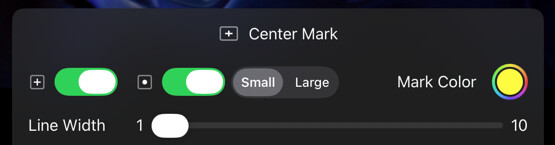
Long-press the Center Mark button in the Assist Toolbar to open or close its options drawer. On Mac, you can also select the chevron beside the button. Select the tool button to turn the effect on or off.
- Turn on Crosshair, Center Dot, or both.
- Adjust the mark color and opacity so it remains visible without obscuring the subject.
Options
| Option | Values | Default | Description |
|---|---|---|---|
| Crosshair | On/Off | On | Toggles the visibility of the crosshairs. |
| Center Dot | On/Off | Off | Toggles the visibility of the center dot. |
| Dot Size | Small/Large | Small | Selects the size of the center dot. |
| Line Width | 1–10 | - | Controls the stroke width of the crosshairs. |
| Mark Color | Color & alpha | White, 50% | Controls the color and opacity of the mark. |
As with all other composition tools, the Center Mark respects the aspect ratio of the input image and Framing Guide A, if enabled.