
Composition Guides
Composition Guides overlay reference lines on the image to assist with alignment and composition. There are two guide types, Grid and Golden Spiral, each with its own toggle, so you can turn on either one independently, or both at once.

The Grid guide is free. The Golden Spiral guide is available with the PRO Video Monitoring Pack or a PRO Pass subscription.
Grid
The Grid guide overlays a series of evenly spaced horizontal and vertical lines. Set 2 horizontal and 2 vertical lines for a Rule of Thirds layout, or adjust each axis independently up to 20 lines. Setting an axis to 0 turns its lines off entirely, so you can show vertical-only or horizontal-only reference guides.
Golden Spiral
The Golden Spiral guide overlays a spiral based on the golden ratio, a classic composition aid. You can flip it horizontally or vertically to match your framing, and optionally show the underlying golden rectangle squares.
Basic use
Long-press the Composition Guides button in the Assist Toolbar to open or close its options drawer. On Mac, you can also select the chevron beside the button. Select the tool button to turn the effect on or off.
- Turn on Grid, Golden Spiral, or both.
- Set the grid line counts or flip the spiral to suit your framing.
Options
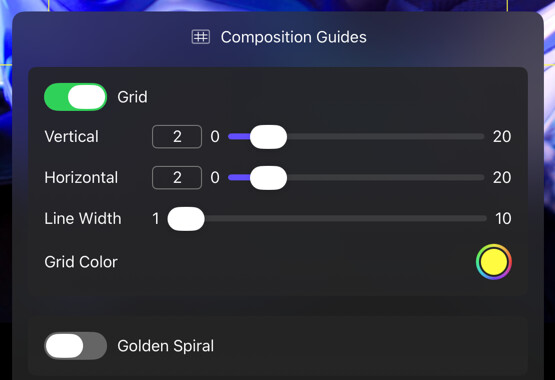
Grid
| Option | Values | Default | Description |
|---|---|---|---|
| Grid | On/Off | Off | Turns the Grid guide on or off. |
| Vertical | 0–20 | 2 | Sets the number of equally spaced vertical lines. 0 hides them. |
| Horizontal | 0–20 | 2 | Sets the number of equally spaced horizontal lines. 0 hides them. |
| Line Width | 1–10 | - | Controls the stroke width of the grid lines. |
| Grid Color | Full color and alpha | White, 50% | Controls the color and opacity of the grid. |
Golden Spiral
| Option | Values | Default | Description |
|---|---|---|---|
| Golden Spiral | On/Off | Off | Turns the Golden Spiral guide on or off. |
| Flip H | On/Off | Off | Mirrors the spiral horizontally. |
| Flip V | On/Off | Off | Mirrors the spiral vertically. |
| Spiral Color | Full color and alpha | - | Controls the color and opacity of the spiral. |
| Squares | On/Off | Off | Shows the golden rectangle squares behind the spiral. |
| Square Color | Full color and alpha | - | Controls the color and opacity of the squares (available when Squares is on). |
| Line Width | 1–10 | - | Controls the stroke width of the spiral and squares. |
Composition Guides respect the aspect ratio of the input image and Framing Guide A, if enabled.