
Anamorphic Desqueeze
This tool restores an image that has been squeezed with an anamorphic lens to its correct proportions, by stretching its width. This keeps the full vertical resolution intact, so a 2x factor keeps the same height and doubles the width. Use the preset buttons to select common squeeze factors or use the slider to dial in a custom value.
Available with the CineMon PRO Video Monitoring Pack or a CineMon PRO Pass subscription.
Basic use
Long-press the Desqueeze button in the Assist Toolbar to open or close its options drawer. On Mac, you can also select the chevron beside the button. Select the tool button to turn the effect on or off.
- Select the preset that matches your lens squeeze factor.
- Use Factor for a custom value and check that subjects have the expected proportions.
Options
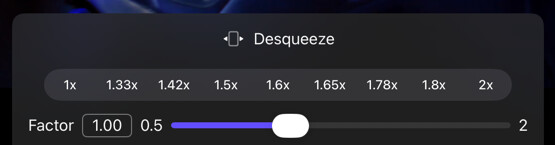
| Option | Values | Default | Description |
|---|---|---|---|
| Desqueeze Presets | 1x, 1.33x, 1.42x, 1.5x, 1.6x, 1.65x, 1.78x, 1.8x, 2x | 1x | Shortcuts to popular desqueeze factors. |
| Factor | 0.5x–2x | 1x | Fine‑tune the desqueeze factor with the slider. |
Values between
0.5xand1xcan be useful when using an anamorphic lens with a camera that is rotated 90°.