
Image Adjust
This tool provides look-oriented image adjustment controls: contrast, saturation, color temperature, tint, and hue. It does not include exposure; for a photometric exposure shift, see the Exposure tool.
Available with the CineMon PRO Video Monitoring Pack or a CineMon PRO Pass subscription.
Basic use
Long-press the Image Adjust button in the Assist Toolbar to open or close its options drawer. On Mac, you can also select the chevron beside the button. Select the tool button to turn the effect on or off.
- Adjust the control for the change you want to preview.
- Turn the tool off and on to compare the adjustment with the original preview.
Options
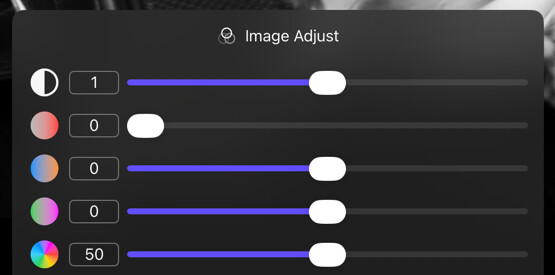
| Option | Values | Default | Description |
|---|---|---|---|
| Contrast | 0–2 | 1 | Adjusts the image contrast. |
| Saturation | 0–2 | 1 | Adjusts the image saturation. 0 is fully desaturated (black and white). |
| Temperature | -4000–+4000 K | 0 K | Adjusts the color temperature in Kelvin. |
| Tint | -100–+100 | 0 | Adjusts the image tint from green to magenta. |
| Hue | 0–100 | 50 | Performs a hue rotation in CW or CCW direction. |
Tips
Pull Saturation to zero in combination with Focus Peaking for very busy scenes where a single peaking color is not visually distinctive.